Download Vietnam & USA VPN for Chrome, Windows, Mac and Android
Free Cloudj VPN app for Android, Chrome, Firefox, Windows, macOS and Linux. Switch your IP to Vietnam or the USA in one click with a dedicated IP100,000 ₫.
- The apps only connect to IPs you bought. Buying, renewing and settings stay on the website.
Phones and tablets
Android
Your whole phone through a Vietnam or USA IP, games included · Android 8.0+
Or use a third-party app: v2rayNG
iPhone and iPad (iOS)
Shadowrocket, V2Box and v2rayNG are third-party apps; Cloudj does not develop or manage them.Use it now on iPhone/iPad
- Install Shadowrocket or V2Box from the App Store.
- On cloudj.net: Sign in › VPN › open your plan.
- Scan the QR code or add the subscription link in the app, then connect.
Download for every device
Phone
Download the VPN for Android (APK)
Android 8.0 or later · not on Google Play yet
Computer
Browser
How to install
Choose your device. Each guide has its download right next to it.
Download the VPN for Android (APK)
Android 8.0 or later · not on Google Play yet
- Tap Download APK, then open the file from the notification or your Downloads folder.
- If Android asks, turn on “Allow from this source” for your browser (Install unknown apps), then tap Install.
- Open Cloudj VPN, tap Connect account and approve the code at cloudj.net/link (signed in).
- Tap an IP and choose OK when Android asks to allow the VPN. A key icon in the status bar means you are connected.
Your whole phone (every app, games and UDP included) goes through the IP you pick. Disconnect from the app or from the notification.
Check your IP: open api.ipify.org or whatismyipaddress.com. It should show the IP you connected to.
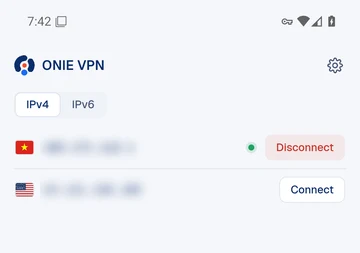
Download VPN for Windows PC
Windows 10 and 11, 64-bit
- Download the installer (.exe, 64-bit) and run it.
- If SmartScreen shows “Windows protected your PC”, press More info, then Run anyway, and finish the installer.
- Open Cloudj VPN, press Connect account and approve the code at cloudj.net/link while signed in.
- The first time you turn on Full device, approve the Windows administrator prompt (UAC) once to install the network helper.
- Click an IP to connect.
Full device (every app, including games and UDP) is in beta on Windows from version 1.0.3 and is still being tested on real PCs. If it does not work on your PC, choose Browser only in the app.
Check your IP: open api.ipify.org or whatismyipaddress.com. It should show the IP you connected to.
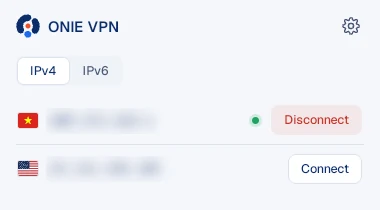
VPN for MacBook (macOS)
Apple silicon (M1 or newer)
- Open the .dmg file and drag Cloudj VPN into Applications.
- First launch: open System Settings, then Privacy & Security, and press Open Anyway (macOS 15 or newer). On older macOS, right-click the app and choose Open.
- Click the Cloudj VPN icon in the menu bar, press Connect account and approve the code at cloudj.net/link while signed in.
- The first time you turn on Full device, enter your Mac password once to install the helper.
- Click an IP to connect.
An Intel Mac build is not available yet.
Check your IP: open api.ipify.org or whatismyipaddress.com. It should show the IP you connected to.
VPN for Linux
Debian, Ubuntu and other distributions
- .deb (Debian, Ubuntu): run sudo apt install ./file.deb in the download folder.
- AppImage (any distribution): run chmod +x file.AppImage, then open it.
- Press Connect account and approve the code at cloudj.net/link while signed in.
- Click an IP to connect.
Check your IP: open api.ipify.org or whatismyipaddress.com. It should show the IP you connected to.
VPN Chrome extension
Chrome, Edge and Brave
- Download the extension (.zip) and unzip it.
- Open chrome://extensions (edge://extensions in Edge, brave://extensions in Brave) and turn on Developer mode at the top right.
- Press Load unpacked and choose the unzipped folder.
- Pin Cloudj VPN from the puzzle icon on the toolbar.
- Open the extension, press Connect account and approve the code at cloudj.net/link while signed in.
- Click an IP to connect. Click another IP to switch.
The extension routes the browser only. To route every app on your computer, use the desktop app.
Check your IP: open api.ipify.org or whatismyipaddress.com. It should show the IP you connected to.
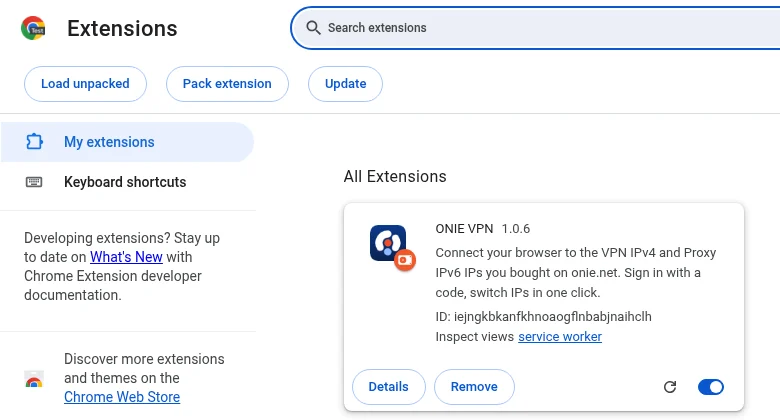
VPN add-on for Firefox
Firefox on Windows, macOS and Linux
- Download the add-on (.zip).
- Open about:debugging, then choose This Firefox.
- Press Load Temporary Add-on and pick the .zip file.
- Open the add-on, press Connect account and approve the code at cloudj.net/link while signed in.
- Click an IP to connect.
This build is not signed by Mozilla (AMO) yet, so Firefox removes it when it closes: load it again after each restart. A signed version will replace it here.
Check your IP: open api.ipify.org or whatismyipaddress.com. It should show the IP you connected to.
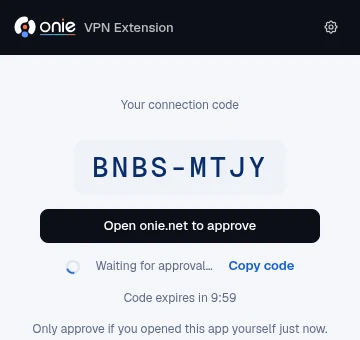
Change your IP to the USA or Vietnam on your computer in 3 steps
- 01
Buy a dedicated IP
Choose Vietnam or the USA on the VPN page. Plans are billed by the day, week, month or year.
- 02
Install the app
Install the Chrome extension, the desktop app or the Android app from this page.
- 03
Connect
Connect your account with a code, then click an IP. Your browser or computer now goes out through that IP.
Prices, locations and features: VPN service · See VPN for gaming
Frequently asked questions
Verify downloads & unsigned builds
The desktop apps and browser extensions are not code-signed yet, so Windows, macOS or your browser may warn you when you open them. Compare the SHA-256 below with the file you downloaded to make sure it is intact, then open it with the steps for your platform.
| Platform | File | Version |
|---|---|---|
| Download the VPN for Android (APK) | cloudj-vpn-android-1.0.4-arm64.apk | 1.0.4 |
| Download the VPN for Android (APK) | cloudj-vpn-android-1.0.4-universal.apk | 1.0.4 |
| Download VPN for Windows PC | cloudj-vpn-desktop-1.0.3-x64-setup.exe | 1.0.3 |
| VPN for MacBook (macOS) | cloudj-vpn-desktop-1.0.2-arm64.dmg | 1.0.2 |
| VPN for Linux | cloudj-vpn-desktop-1.0.3-x86_64.AppImage | 1.0.3 |
| VPN for Linux | cloudj-vpn-desktop-1.0.3-amd64.deb | 1.0.3 |
| VPN Chrome extension | cloudj-vpn-chrome-1.0.6.zip | 1.0.6 |
| VPN add-on for Firefox | cloudj-vpn-firefox-1.0.6.zip | 1.0.6 |
Install the web app
Web app
The Cloudj console itself can be installed from the browser on a phone or computer: its own window, a Home Screen icon and notifications.